Docs
Baking & Exporting
Converting a finished network to static geometry.
A Pipe Network stays editable, which has a small cost. When a network is final, you can bake it into plain static geometry built from ordinary engine components; no PipeIt code is needed to render it. The baked result still uses the plugin’s meshes and materials, though; see What the baked result still depends on.
Where to bake
Select the network and find the Bake row in the Pipe It category of the details panel: a dropdown to pick what the bake produces, next to a Bake button.
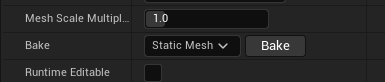
The Bake row: pick a target in the dropdown, then click Bake.
| Bake target | What it produces |
|---|---|
| Static Mesh | One merged static mesh asset for the whole network. |
| Components | A plain actor with one static mesh component per piece. |
| ISMs | A plain actor with pieces grouped into instanced static meshes: one draw call per unique mesh and material set. The right choice when you bake for instancing. |
| HISMs | Like ISMs, but hierarchical. Only useful on platforms without GPU-driven rendering; prefer ISMs otherwise. |
Bake to Static Mesh
- Pick Static Mesh in the Bake dropdown and click Bake.
- A save dialog asks where to store the new asset (default name
SM_<network name>_Baked). - PipeIt merges every piece into one mesh: the pipe stretch is baked into the UVs, and curved (flexi) runs are baked into the vertices. A static mesh actor using the new asset is placed at the network’s location.
- You are asked whether to delete the original PipeIt actor. Deleting it removes the editable graph; keep it (or a duplicate) if you might re-edit the layout.
Two things change compared to the live network:
- The merged mesh is a plain static mesh: it does not inherit the kit meshes’ Nanite settings.
- It gets a default collision setup rather than the kit meshes’ collision primitives. Set up collision on the baked asset if you need it.
Bake to Components, ISMs, or HISMs
- Pick Components (or ISMs / HISMs) and click Bake.
- A plain actor named
<network name>_Bakedis spawned in place, carrying the pieces as ordinary components. Curved (flexi) runs stay individual spline mesh components in every mode; spline deformation cannot be instanced. - You are asked whether to delete the original PipeIt actor.
- Finally, PipeIt offers to turn the baked actor into a reusable Blueprint asset: the baked actor is replaced with an instance of the new Blueprint, which you can drop into any level.
Because these modes reference the kit’s original mesh assets (rather than merging geometry), the kit meshes’ Nanite settings and collision carry over unchanged, and each piece keeps its materials.
When to bake
- The layout is final and no longer needs editing.
- You want geometry that renders without the plugin’s code, or a merged mesh to hand to another tool or pipeline.
What the baked result still depends on
Baking removes the need for PipeIt code: the output is made of standard engine actors, components, and assets. It does not copy the plugin’s content, so the result still references it:
- Components / ISMs / HISMs bakes place components that point directly at the kit’s meshes and materials under the plugin’s content folder.
- Static Mesh bakes create a new, independent mesh asset in your project, but its materials are the kit materials (or instances of them), which live in the plugin’s content and reference the plugin’s textures.
In practice this means the plugin (or at least its content) must stay installed in any project that uses the baked output. If you remove it:
- a baked static mesh keeps its shape but renders with the default grey material;
- baked components lose their meshes entirely and render nothing.